
The ultimate guide to ecommerce image optimization

Why Your Product Images Could Be Costing You Sales
Image optimization for ecommerce sites is the process of reducing image file sizes and improving how they load — without sacrificing visual quality — so your store loads faster, ranks higher, and converts more visitors into buyers.
Here’s how to optimize images for your ecommerce site:
- Choose the right format — Use WebP or AVIF for product photos, PNG for transparency, SVG for logos and icons
- Compress images — Target under 200KB per image using tools like Squoosh or TinyPNG
- Resize before uploading — Match image dimensions to their display size on your site
- Use responsive images — Serve different sizes to mobile vs. desktop users with
srcset - Lazy load below-the-fold images — Only load what’s visible first
- Use a CDN — Deliver images from servers close to your shoppers
- Write descriptive filenames and alt text — Help search engines understand what your images show
- Add images to your sitemap — Increase your chances of appearing in Google Image Search
Here’s the uncomfortable truth: your product images are likely the single biggest drag on your store’s performance.
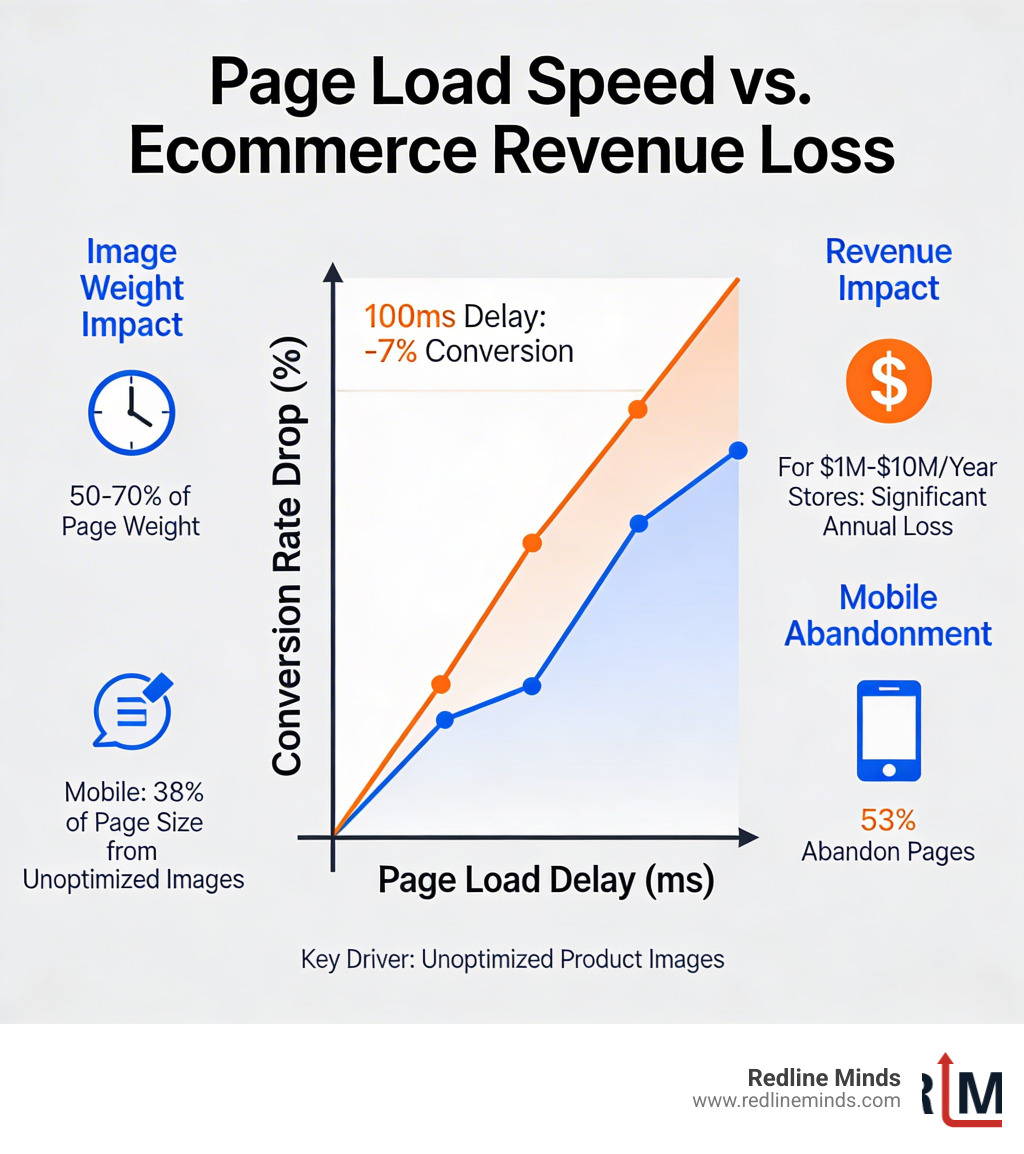
Images consume 50–70% of average page weight. On mobile, unoptimized images alone account for nearly 38% of a page’s total size. And a 100-millisecond delay in load time can cut your conversion rate by up to 7%.
For a store doing $1M–$10M a year, that’s real money walking out the door.
Shoppers don’t wait. 53% of mobile visitors abandon a page that takes more than three seconds to load. And over 45% of shoppers say they’re less likely to buy from a store that loads slower than they expect.
The good news? Properly optimized images can reduce page load times by 50–70% on image-heavy pages. That’s not a minor tweak — it’s a meaningful performance shift that shows up in rankings, bounce rates, and revenue.
This guide walks you through every layer of ecommerce image optimization: formats, compression, responsive delivery, SEO, and the tools that make it scalable.
Why image optimization ecommerce sites is a revenue driver
At Redline Minds, we often see beautiful storefronts that are essentially “suffocating” under the weight of their own high-resolution photography. We all want our products to look stunning, but if those 5MB hero shots prevent a customer from seeing the “Add to Cart” button within two seconds, the beauty is wasted.
The Core Web Vitals Connection
Google uses a set of metrics called Google Core Vitals – Ecommerce Sites – Should You Worry? to judge the health of your site. The most important one for images is Largest Contentful Paint (LCP). This measures how long it takes for the largest piece of content on the screen (usually a product image or banner) to become visible.
If your LCP is over 2.5 seconds, Google considers your site slow. This doesn’t just frustrate users; it actively hurts your SEO rankings. A slow page means search engines crawl fewer pages within their “crawl budget,” which can negatively affect how many of your products actually show up in search results.
The Conversion Killer: Friction
According to Akamai, a 100-millisecond delay in load time can hurt conversion rates by up to 7%. Think about that: a tenth of a second—less time than it takes to blink—costs you money.
When we talk about Page Load Speed, we are talking about the “patience threshold” of a modern shopper. 47% of consumers expect a product page to load in 2 seconds or less. If your images are unoptimized, you’re essentially asking your customers to do you a favor by waiting. In the competitive world of B2B and hybrid ecommerce, they simply won’t.
Mobile Abandonment
Mobile devices now account for over 50% of web views globally, and in many ecommerce sectors, that number climbs past 70%. Mobile users are often on less stable connections. Data shows that 53% of mobile visitors will abandon a page if it takes more than three seconds to load. By focusing on image optimization ecommerce sites, you are directly protecting your mobile revenue.

Technical strategies for image optimization ecommerce sites
Optimization isn’t just about making things smaller; it’s about being smart with file types and compression. We use a variety of Performance Improvement techniques to find the “sweet spot” where an image looks perfect but weighs almost nothing.
Choosing the Right Format
The “Big Four” formats in modern ecommerce are JPEG, PNG, WebP, and AVIF.
- JPEG: The old reliable. Best for complex product photos where you don’t need transparency.
- PNG: Best for simple graphics, logos, or images that require a transparent background. However, they are often much heavier than JPEGs.
- WebP: The modern standard. WebP images are generally 25–35% smaller than JPEGs at the same quality level.
- AVIF: The next frontier. AVIF can deliver 50% smaller file sizes than JPEG while maintaining incredible perceptual quality.
| Format | Best Use Case | Compression | Browser Support |
|---|---|---|---|
| JPEG | Standard product photos | Lossy | Universal |
| PNG | Logos, transparency | Lossless | Universal |
| WebP | All-purpose ecommerce | Lossy/Lossless | High (97%+) |
| AVIF | High-performance hero shots | Superior Lossy | Growing (86%+) |
| SVG | Icons, simple vectors | Lossless (Code) | Universal |
Lossy vs. Lossless Compression
- Lossless compression reduces file size without losing a single pixel of data. It’s great for logos but doesn’t save much space on photos.
- Lossy compression “discards” data that the human eye can’t really see. For ecommerce product photos, lossy compression is usually the way to go. You can often reduce a file’s size by 70-80% without a shopper ever noticing the difference.
Professional Tools
We recommend using tools like Squoosh for manual control over individual hero images. For bulk optimization, TinyPNG is a fantastic resource that uses smart lossy compression to shrink WebP, JPEG, and PNG files. If you are on a platform like WordPress or Shopify, there are plugins that can automate this entire process for you as you upload.
Implementing responsive images and lazy loading
One of the biggest mistakes we see is serving a “one-size-fits-all” image. If you upload a 2000px wide image for your desktop users, but a shopper visits on an iPhone, their phone still has to download that massive 2000px file only to shrink it down to 400px. That is wasted bandwidth and wasted time.
The Power of srcset and sizes
By Serving responsive images, you tell the browser: “Here is a list of different sizes for this image. You pick the one that fits the user’s screen.”
The srcset attribute allows you to define a list of image URLs and their widths, while the sizes attribute tells the browser how wide the image will be displayed on the screen. This ensures that a mobile user gets a 400px image while a desktop user gets the high-res 1200px version.
Native Lazy Loading
Lazy loading is a technique where the browser only downloads an image when it’s about to enter the user’s viewport (the part of the screen they are actually looking at).
For Dynamic Product Pages, this is critical. If you have a gallery of 12 product photos, why load the 12th photo before the user has even scrolled past the first one? By adding loading="lazy" to your image tags, you prioritize the initial load speed.

Pro Tip: Never lazy load your “above-the-fold” images (like your main hero banner). If you do, it can actually delay your LCP and hurt your performance scores.
Leveraging CDNs and browser caching
A Content Delivery Network (CDN) is a group of servers spread out across the globe. When you use a CDN, your images are stored on all these servers. When a shopper in Tennessee visits your site, they get the images from a server in the Southeast. If a shopper in London visits, they get them from a server in the UK.
Edge Delivery
This reduces “latency”—the time it takes for data to travel from your server to the customer’s device. Many modern platforms, like Shopify’s CDN, handle this automatically. If you’re using a custom setup or a platform like Magento, integrating a CDN like Cloudflare or Amazon CloudFront can reduce your image payload by 30–60% almost instantly.
Browser Caching
Browser caching tells a visitor’s computer: “You’ve seen this logo before. Don’t download it again; just use the copy you saved last time.” By configuring your Cache-Control headers for a long duration (like one year), you make repeat visits to your store feel lightning-fast. This significantly improves the Time to First Byte (TTFB) and overall user experience on your Pagebuilder layouts.
Mastering image SEO and search visibility
Many store owners forget that images are a massive source of traffic. Recent data shows that images are returned for 36.7% of search queries on Google. If your images aren’t optimized for search, you are missing out on over a third of your potential visibility.
Descriptive Filenames
Stop uploading files named IMG_5678.jpg. Search engines aren’t psychic; they need you to tell them what the image is. Rename your files to something descriptive like mens-leather-hiking-boots-brown.jpg. Use hyphens to separate words, as search engines read hyphens as spaces.
Alt Text Best Practices
Alt text (alternative text) is a short description of an image that appears if the image fails to load and is read by screen readers for visually impaired users. It is also a major SEO signal.
According to Alt text best practices, you should:
- Be descriptive but concise (under 125 characters).
- Include your target keyword naturally.
- Include model or serial numbers for technical products.
- Avoid “keyword stuffing” (e.g.,
alt="boots buy boots best boots cheap boots").
Image Sitemaps
Google has many guidelines for image publishing, and one of the best ways to ensure they find all your visuals is through an image sitemap. This is especially important if your store uses JavaScript galleries or “pop-up” images that search engine crawlers might otherwise struggle to find.
Advanced image optimization ecommerce sites: Structured data
To really stand out, we use Product Schema. This is a bit of code that tells Google: “This image isn’t just a picture; it’s a product that costs $49.99 and is currently in stock.”
When you implement structured data correctly, your images can appear as “Rich Snippets” in search results, complete with price, availability, and star ratings. This drastically increases your click-through rate (CTR) from Google Images and the main search results page.
This is a key part of the broader discussion on Google Core Vitals – Ecommerce Sites – Should You Worry?. While Core Vitals focus on speed, structured data focuses on “meaning.” Both are required for a high-ranking store.
Frequently Asked Questions about ecommerce image optimization
How often should I audit my site’s images?
We recommend a full performance audit at least quarterly. However, you should check your optimization workflow every time you have a new product launch. Using tools like Lighthouse (built into Chrome) can help you quickly identify if any new, unoptimized images have “sneaked” onto your site and are dragging down your scores.
Can I use AI to generate product images?
AI is a fantastic tool for creating lifestyle “scenes” or concept testing, but it still has precision limitations for physical product photos. If you sell a specific bolt or a dress with a unique pattern, AI might hallucinate details that aren’t there, leading to customer returns. Use AI for backgrounds or supplemental visuals, but stick to professional photography for the core product shots.
Does image optimization affect visual quality?
If done correctly, no. The goal is “perceptual quality”—meaning the image looks identical to the human eye, even if some of the digital “noise” has been removed to shrink the file size. For high-DPI (Retina) displays, we often serve images at 2x the display size but with higher compression levels. This keeps the image sharp on high-end phones without the massive file size of a “perfect” uncompressed image.
Conclusion
At Redline Minds, we’ve seen how image optimization for ecommerce sites can transform a struggling store into a high-performance sales machine. It’s not just a technical chore; it’s a fundamental part of your conversion strategy. By reducing friction, improving SEO, and respecting your customers’ time, you build a brand that people trust and return to.
Whether you are running a high-volume B2B portal or a niche boutique, the rules of speed remain the same. Track your ROI by monitoring your page load times and conversion rates before and after these changes—you’ll likely be surprised at how much revenue was being left on the table.
Ready to stop losing sales to slow-loading pages? Scale your store with expert ecommerce services from the team at Redline Minds. Based right here in Tennessee, we specialize in helping retailers like you build faster, smarter, and more profitable online stores. Reach out to us at our Jefferson City office to start your performance audit today.