
Choosing Your Transactional Message Champion: Klaviyo or Shopify
Understanding Shopify vs. Klaviyo Transactional Messages
Shopify vs. Klaviyo transactional messages work very differently — and choosing the wrong setup can quietly hurt your customer experience and revenue.
Here’s the quick answer:
| Feature | Shopify Native | Klaviyo |
|---|---|---|
| Setup speed | Instant, zero config | Requires flow setup + approval |
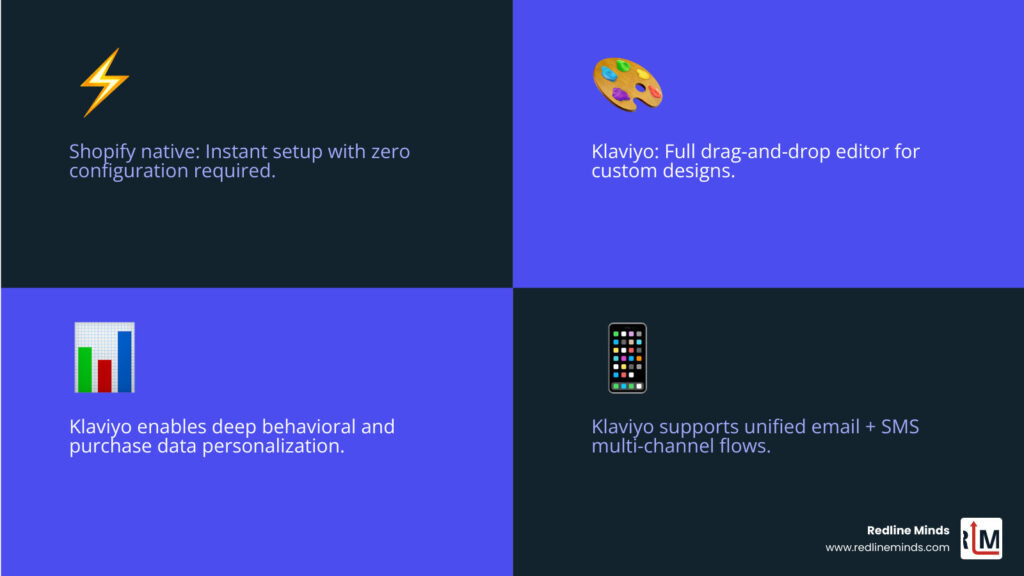
| Design flexibility | Limited (Liquid templates) | Full drag-and-drop customization |
| Personalization | Basic order data | Deep behavioral + purchase data |
| Counts toward send limit | No | Yes |
| Multi-channel (SMS + email) | Email only | Email + SMS unified flows |
| Disabling default emails | Shopify Plus only | N/A |
| Best for | New or small stores | Growing, scaling stores |
Transactional messages are the automated emails and texts your store sends after a customer takes action — think order confirmations, shipping updates, and refund notices.
They aren’t marketing emails. Customers expect them. They open them immediately.
That’s why transactional messages consistently hit 80–85% open rates — far above any promotional campaign you’ll run. Every one of those opens is a chance to reinforce your brand, build trust, and drive the next purchase.
For a store doing $1M–$10M in annual sales, these touchpoints aren’t just operational. They’re strategic.
The problem? Shopify and Klaviyo handle them in fundamentally different ways. Shopify makes it easy to get started, but limits what you can do. Klaviyo gives you serious power — but requires more setup and counts these sends against your monthly quota.
Knowing which platform fits your situation could save you money, improve customer experience, and eliminate a lot of unnecessary headaches.
When we talk about Shopify vs. Klaviyo transactional messages, we are diving into the most important real estate in your customer’s inbox. Because these messages have open rates of 80% or higher, they represent a captive audience. Unlike a newsletter that might get swiped away, an order confirmation is something a customer will likely open multiple times to check their tracking or verify their items.
In our experience at Redline Minds, we see many merchants treat these as “set it and forget it” notifications. However, if you want to build deep brand trust, you need these messages to do more than just relay data. They should reflect your brand’s voice and offer a seamless transition from the shopping experience to the post-purchase journey.
This is especially true for B2B and hybrid stores where the relationship doesn’t end at the “Buy” button. A transactional message might be the start of a long-term contract or a recurring wholesale relationship. Understanding the Ecommerce Email Marketing Guide is essential for realizing that every touchpoint is a marketing opportunity, even the “boring” ones.
The revenue impact of optimizing these messages is often underestimated. While a marketing email might drive a quick spike in sales, a well-crafted transactional email reduces customer support inquiries. It increases the likelihood of a second purchase through subtle, personalized recommendations.

The Role of Shopify vs. Klaviyo Transactional Messages in Customer Retention
Customer retention is the lifeblood of any scaling ecommerce business. It is much cheaper to keep a customer than to acquire a new one. Transactional messages are the first step in the post-purchase retention loop.
When a customer receives a beautiful, clear, and helpful shipping update, their anxiety decreases and their satisfaction increases. This is where you win or lose the “second sale.” We often guide our clients through the Must-Have Email Automation Flows for Ecommerce to ensure they aren’t leaving money on the table.
If your marketing emails look like a high-end fashion magazine but your order confirmation looks like a 1995 receipt, you’ve broken the brand spell. Consistency matters. Whether you choose Shopify’s native tools or Klaviyo’s advanced system, the goal is to make the customer feel like they are still interacting with the brand they just trusted with their credit card.
Key Differences in Shopify vs. Klaviyo Transactional Messages Delivery
One of the biggest technical hurdles in the Shopify vs. Klaviyo transactional messages debate is how they are delivered. Shopify’s native notifications are “hard-wired” into the platform. They trigger the millisecond an order is placed.
Klaviyo, on the other hand, operates as a third-party platform. To ensure that transactional emails are delivered immediately and bypass “Smart Sending” (which might skip an email if a customer just received a newsletter), Klaviyo uses a specific “green badge” status. This status ensures the email is sent regardless of whether the customer has opted out of marketing.
When we compare Klaviyo for Shopify vs SendLane, we often highlight that Klaviyo’s infrastructure is built specifically to handle the heavy data lifting required for these immediate triggers. However, getting that “green badge” isn’t automatic — it requires a manual approval process from the Klaviyo team to ensure you aren’t trying to sneak marketing content into a transactional wrapper.
Shopify’s Native Transactional System: Simplicity and Speed
If you are just starting out, Shopify’s native system is incredibly hard to beat. It is built-in, ready to go, and requires zero configuration to work. You don’t have to worry about API connections or data syncing; it just works.
Shopify uses a templating language called Liquid. This allows the system to pull in dynamic data such as the customer’s name, the items they bought, and the total price. For developers or those comfortable with code, the Shopify Notification variables reference provides a roadmap for customizing these templates.
The biggest “pro” for Shopify is the cost. Shopify does not charge you per transactional email sent, and these sends do not count against your Shopify Email marketing limits. For a high-volume store on a tight budget, this “free” delivery is a significant advantage.
Limitations of Native Messaging
While Shopify’s system is fast and reliable, it is also very rigid. Unless you are a Liquid expert, making these emails look “on-brand” is a challenge. You are largely stuck with the default layout, and adding complex elements — like a dynamic product recommendation based on what they didn’t buy — is nearly impossible.
Furthermore, Shopify provides very basic analytics for these notifications. You can’t easily see open rates or click-through rates for your order confirmations within the standard Shopify admin. If you are a Shopify Plus merchant, you have more control, but for standard plans, you are quite limited.
For brands that need a more tailored experience, we often suggest looking into More info about Shopify services to see how custom development might bridge the gap, or if it’s time to move the heavy lifting over to a platform like Klaviyo.
Klaviyo’s Transactional Power: Customization and Data
This is where things get exciting for data-driven brands. Klaviyo treats transactional messages like any other “Flow,” meaning you have access to the full drag-and-drop editor. You can build beautiful, multi-column layouts, add images, and use the same branding blocks you use for your weekly newsletters.
But the real power lies in the data. Because Klaviyo has a deep sync with your Shopify store, it knows everything about your customers. You can create different versions of an order confirmation for a first-time buyer versus a VIP customer. You can even branch your flows; for example, if someone buys a specific “heavy” item, you can send them a different shipping notification than someone who bought a digital gift card.
Klaviyo also brings multi-channel capabilities to the table. With Klaviyo SMS Order Updates, you can give customers the choice to receive their tracking info via text. Considering SMS has nearly a 99% open rate, this is a massive win for customer satisfaction.
The Transactional Approval Workflow
With great power comes great responsibility — and a bit of paperwork. Klaviyo is very protective of its deliverability reputation. To prevent merchants from abusing the “transactional” status to send marketing spam, they require a manual review of every transactional flow.
You must create your flow, then contact Klaviyo support with the flow URL and subject lines. They will review it to ensure it is purely informational. Once approved, you get that coveted “green badge,” and the flow will bypass marketing opt-out settings.
When we look at Klaviyo vs Omnisend for Shopify, Klaviyo’s rigorous approval process is actually a benefit. It protects your sender reputation by ensuring your transactional emails aren’t flagged as spam, which keeps your overall deliverability high for your marketing campaigns, too.
Strategic Comparison: When to Switch or Stay
The decision of Shopify vs. Klaviyo transactional messages often comes down to the stage of your business. If you are a small store with a limited list, the simplicity and zero cost of Shopify are hard to ignore.
However, as you scale, the lack of data and design flexibility starts to feel like a bottleneck. If you want to use your order confirmation as a strategic tool — perhaps to encourage a subscription or to offer a “thank you” discount for their next purchase — Klaviyo is the clear winner.
| Factor | Shopify Native | Klaviyo Transactional |
|---|---|---|
| Data Usage | Basic order info only | Full behavioral & purchase history |
| A/B Testing | No | Yes |
| SMS Integration | Basic/Third-party | Native unified flows |
| Analytics | Minimal | Full revenue attribution & engagement |
| Complexity | Low | Medium (requires approval) |
For B2B or hybrid stores, Klaviyo’s ability to segment based on custom attributes (like “Wholesale Account” or “Tax Exempt Status”) allows you to send much more professional, relevant communications than Shopify’s one-size-fits-all templates.
The Hybrid Approach for Scaling Stores
There is a “middle ground” that we often implement for our clients at Redline Minds. You can design your templates in Klaviyo’s beautiful drag-and-drop editor and then export the HTML code into Shopify’s notification settings.
This gives you the best of both worlds: Klaviyo’s design power and Shopify’s free, instant delivery. However, there is a catch. Because the email is still being sent by Shopify, you won’t get the advanced tracking and analytics inside Klaviyo. You also won’t be able to use Klaviyo’s multi-step flow logic (like sending a follow-up SMS if the email isn’t opened).
When comparing Klaviyo vs Mailchimp for Shopify, it’s clear that Klaviyo’s ability to handle these hybrid needs is superior, but it does require a bit of technical know-how to ensure the Liquid tags are formatted correctly after the export.
Frequently Asked Questions about Shopify vs. Klaviyo Transactional Messages
Does Klaviyo charge for transactional emails?
Yes. Unlike Shopify, Klaviyo counts every email sent toward your monthly plan limit. If you send 5,000 marketing emails and 5,000 transactional order confirmations, you are billed for 10,000 sends. For high-volume stores, this can lead to a significant jump in your monthly bill.
This is a key point we discuss when merchants are looking at Constant Contact vs Klaviyo for Shopify. You have to weigh the cost of those extra sends against the increased revenue and customer satisfaction that better transactional messages provide.
Can I disable Shopify’s default order confirmations?
This is a tricky one. For most merchants on standard Shopify plans, you cannot completely disable the core order confirmation email. Shopify wants to ensure the customer always gets a receipt.
However, if you are a Shopify Plus merchant, you have more flexibility. You can work with your Merchant Success Manager to “mute” certain notifications so that Klaviyo can take over entirely without the customer receiving duplicate emails. We cover more on these technical distinctions in our BigCommerce vs Shopify Technical Comparison.
Which platform has better deliverability for order updates?
Both platforms have excellent deliverability, but they approach it differently. Shopify uses a massive, shared infrastructure that is highly trusted by inbox providers like Gmail and Outlook.
Klaviyo allows you to build your own sender reputation. By using transactional status, your emails are sent via a dedicated “transactional” pathway that isn’t affected by the performance of your marketing blasts. To get the best results, you must ensure your SPF, DKIM, and DMARC records are correctly configured. This is why Klaviyo remains one of the Top 10 Most Popular Shopify Plug-ins — it gives you professional-grade control over your inbox presence.
Conclusion
Choosing between Shopify vs. Klaviyo transactional messages isn’t just about picking a software; it’s about deciding how you want to treat your customers after they’ve given you their money.
At Redline Minds, we specialize in helping B2B and hybrid stores navigate these complex decisions. We know that for a scaling business, every percentage point of open rate and every ounce of brand consistency matters. If you are just starting, stick with Shopify’s native tools to keep your costs low and your setup simple. But the moment you feel limited by design or lack of data, it’s time to look at Klaviyo.
The implementation can be complex, especially when dealing with transactional approvals and Liquid tag exports. If you’re looking for a partner to help you strategize and execute a high-performing email system, we’re here to help.
The final verdict? Shopify is for speed; Klaviyo is for strategy. Making the right choice today will set the foundation for your store’s growth for years to come. For a deeper dive into how these platforms stack up across the board, check out our guide on Choosing the right platform for your store.