
How to Design an Online Store That People Actually Enjoy Using
Why UX UI Design Ecommerce Gets You More Sales Without More Traffic
UX UI design ecommerce is the practice of building online stores that are easy, fast, and enjoyable to use — from the moment a shopper lands on your site to the moment they complete a purchase (and come back again).
Here’s a quick breakdown of what it covers:
- UX (User Experience) — how shopping on your site feels: is it smooth, frustrating, confusing, or satisfying?
- UI (User Interface) — the visual and interactive elements: buttons, menus, product images, checkout forms
- Together, they determine whether a visitor buys from you or clicks away to a competitor
If you’re a retailer doing $1M–$10M in annual sales and growth has stalled, your design is often the silent culprit. Not your products. Not your prices.
The numbers tell a blunt story:
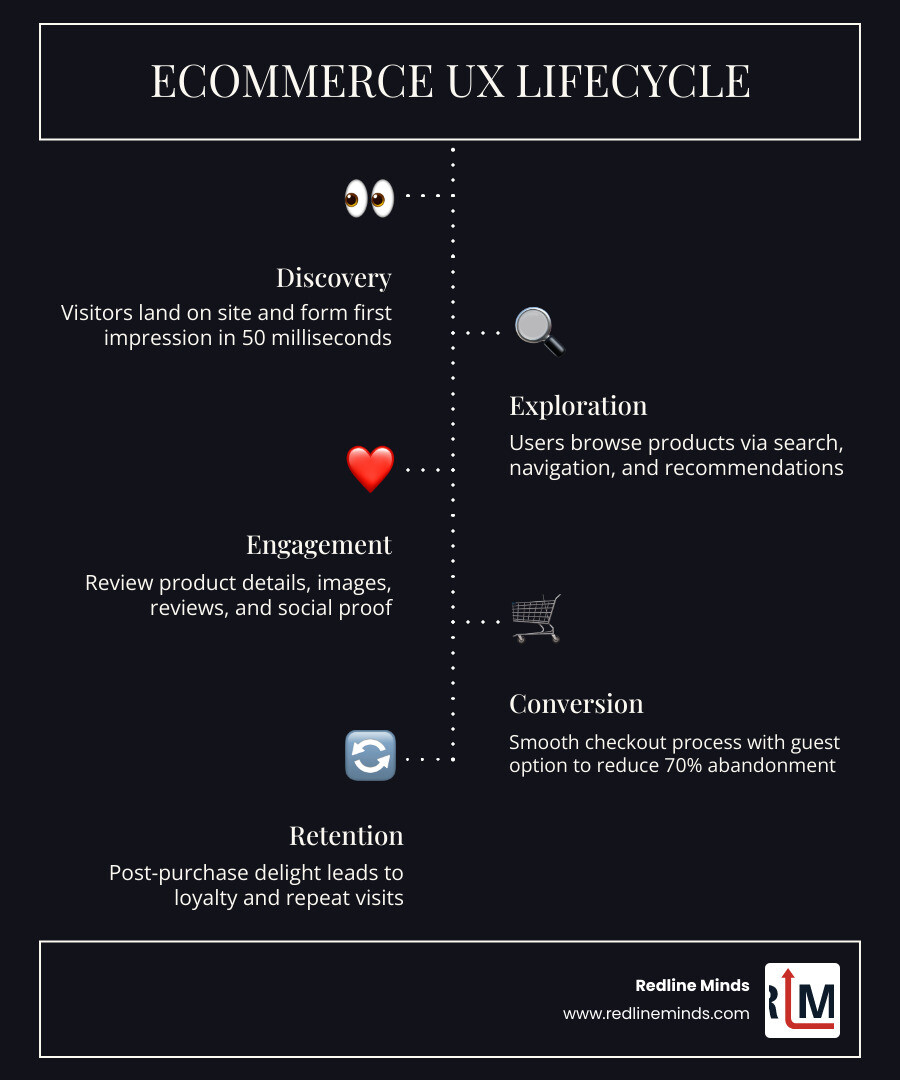
- Visitors form a first impression of your site in 50 milliseconds — before they read a single word
- 70.19% of online shopping carts were abandoned in 2024
- Every $1 spent on UX improvements can return up to $100 in value
Good UX UI design doesn’t just make your store look better. It removes friction at every step — so more visitors become buyers, and more buyers come back.
The Core Pillars of UX UI Design Ecommerce
When we talk about UX UI design ecommerce, we are looking at the foundation of your digital storefront. Think of your website like a physical shop in Jefferson City. If the aisles are cluttered, the lighting is dim, and the checkout line stretches out the door, people will leave without buying a thing.
In the digital world, that clutter is a confusing menu, and that dim lighting is poor-quality imagery. Research shows that spending just $1 on UX returns $100, making it one of the most profitable investments a business can make. However, this only works if you understand the pillars that support a great experience.

Effective ecommerce website design is built on brand positioning and immediate trust. Since visitors form impressions in just 50 milliseconds, your site must instantly communicate what you sell and why the customer should care. This is especially true for the B2B and hybrid stores we specialize in at Redline Minds, where buyers are looking for efficiency and reliability over flashy trends.
The Difference Between UI and UX in Retail
It is common to hear these terms used interchangeably, but they serve different roles in the customer journey.
- UI (User Interface) is the “what.” It’s the color of your “Buy Now” button, the font choice, and the layout of your product grid. It focuses on the visual aesthetics and interaction design.
- UX (User Experience) is the “how.” It’s the logic behind the journey. It’s the feeling of relief when a customer finds exactly what they need in two clicks.
While UI attracts the eye, UX satisfies the brain. A beautiful site that is hard to navigate is a failure; a plain site that works perfectly is a success. We also have to consider accessibility. Ensuring your site meets WCAG 2.1 AA standards isn’t just a legal necessity — it’s good UX. It ensures that every customer, regardless of their abilities, can enjoy a seamless shopping experience.
Why Functionality Trumps Aesthetics
We often tell our clients: “Don’t make me think.” This is a famous rule in usability for a reason. Scientific research on UI/UX impact on user attraction proves that while a pretty site might get someone to stay for a second, it’s the functionality that gets them to buy.
Loading speed is a critical part of this functionality. If your site takes longer than three seconds to load, 40% of people will bounce. They aren’t going to wait around to see your beautiful 4K hero image; they are going to find a competitor whose site actually works. In UX UI design ecommerce, the goal is to reduce friction. Every extra click, every slow-loading script, and every confusing form field is a hurdle between your customer and a completed sale.
Mapping the Ecommerce Customer Journey
A customer’s journey isn’t a straight line; it’s a series of phases. At Redline Minds, we look at this journey through the lens of sales funnels rather than just standalone pages. Whether you are running a B2C fashion brand or a complex B2B equipment store, the journey generally follows a path: Discovery, Search/Browse, Evaluation, and Purchase.
The journey starts with what makes a great homepage for ecommerce. Your homepage shouldn’t just be a digital billboard; it should be a navigation hub that predicts what the user wants next. For B2B buyers, this might mean quick-order forms or easy access to technical specs. For retail browsers, it might mean showing “What’s New” or “Trending Now.”
Intuitive Navigation in UX UI Design Ecommerce
Navigation is the GPS of your online store. If it’s broken, your customers are lost. We recommend using multifaceted navigation that follows the shopper around. This includes:
- Mega Menus: Great for desktop, allowing users to see deep categories at a glance.
- Breadcrumbs: Essential for deep sites, helping users understand where they are and how to get back.
- Predictive Search: As seen on sites like Apple, search bars that suggest products as you type can significantly speed up the path to purchase.
For businesses using BigCommerce services, taking advantage of faceted search is a game-changer. It allows users to filter by size, color, price, or technical specifications without reloading the page, which is vital for maintaining a smooth flow.
Supporting the “Browser” vs. the “Searcher”
Not every visitor arrives with the same intent. Research from the Nielsen Norman Group identifies different types of shoppers, primarily “Searchers” and “Browsers.” Your UX UI design ecommerce strategy must cater to both.
| Feature | The Searcher (Intent-Driven) | The Browser (Discovery-Driven) |
|---|---|---|
| Primary Tool | On-site search bar | Category menus & filters |
| Behavior | Enters specific model names/numbers | Clicks on “New Arrivals” or “Sale” |
| UX Need | Autocomplete & predictive results | High-quality lifestyle imagery |
| Conversion Path | Direct to product page | Journey through multiple categories |
Searchers want speed. 60% of online purchases are not impulsive, meaning these users know what they want. Browsers, on the other hand, represent the 40% of “impulse” money spent in ecommerce. They need inspiration, social proof, and an easy way to stumble upon something they didn’t know they needed.
High-Conversion Product Page Design
The product page is where the “moment of truth” happens. It’s where a visitor decides if they trust your brand enough to hand over their credit card info. A perfect product page design uses visual hierarchy to guide the eye toward the most important information: the product name, the price, and the “Add to Cart” button.
We use a “30-second pitch” approach for above-the-fold content. Within seconds, a user should see exactly what the product is, how much it costs, and if it’s in stock. Details like shipping times and return policies should be visible but not distracting, often tucked into “progressive disclosure” elements like expandable tabs.
Visual Excellence and Social Proof
Since online shoppers can’t touch or feel your products, your visuals have to do the heavy lifting. This means using high-resolution, in-scale photos that show the product in context. If you’re selling a backpack, show it on a person so the buyer understands the size.
Beyond photos, Dr. Robert Cialdini’s principles of persuasion tell us that social proof is essential. People are influenced by the behavior of others. Including customer reviews, star ratings, and user-generated photos builds immediate credibility. In fact, many users will look at the reviews before they even read your official product description.
Managing Product Variants and Availability
One of the biggest friction points in UX UI design ecommerce is variant selection. If a customer clicks “Add to Cart” only to be told they must “Select a Size,” you’ve just annoyed them.
- Color Swatches: Use actual visual swatches instead of just a dropdown menu.
- Out-of-Stock Indicators: Clearly mark sizes or colors that are unavailable before the user tries to select them.
- Price Transparency: If a King-sized mattress costs more than a Queen, the price should update dynamically as the user clicks the options.
For those leveraging Shopify services, variants are easy to manage, but the UI must be designed to handle them elegantly. Nothing kills a sale faster than a user feeling like they have to do “work” just to see the price of a specific item.
Optimizing the Checkout and Performance
The checkout page is the most fragile part of the ecommerce lifecycle. According to the Baymard Institute, 50% of online shoppers abandon their carts because of hidden fees like shipping, taxes, or service charges. Transparency is the best UX. Show the total cost as early as possible.
Performance is equally vital here. We’ve mentioned page load speed before, but it bears repeating: a slow checkout feels like an unsecure checkout. If the page hangs while processing a payment, the customer gets nervous and leaves.
Mobile-First UX UI Design Ecommerce
About half of the traffic on the internet comes from mobile, and that number is only growing. If your site isn’t “thumb-friendly,” you are losing money.
- Responsive Design: Your site should look and work perfectly whether it’s on a 27-inch monitor or a 5-inch iPhone.
- Accelerated Checkouts: Tools like Apple Pay, Google Pay, and Shop Pay allow users to skip the form-filling and buy with a single touch.
- Simplified Forms: On mobile, every form field is a chore. Use auto-fill and minimize the number of steps required to finish.
Reducing Friction to Combat Cart Abandonment
Why do people leave? 28% of shoppers abandon carts because they were forced to create an account. Our advice? Always offer a guest checkout. You can always ask them to create an account after the purchase is complete.
With 70.19% of all online shopping carts abandoned in 2024, retailers must work harder to keep users in the funnel. This means:
- Progress Indicators: Show the user they are on step 2 of 3.
- Order Summaries: Keep a persistent view of what they are buying and for how much.
- Security Icons: Trust badges and SSL icons provide the psychological safety users need to enter their details.
Measuring Success and Continuous Improvement
The best UX UI design ecommerce isn’t a “set it and forget it” project. It is an iterative process. We use data to see where people are getting stuck.
By using tools like ADA compliance audits, we ensure your site is usable for everyone. But we also look at “Mean Opinion Scores” (MOS) and user satisfaction metrics to see how real people feel about the site. Tokopedia, for example, ranks high in satisfaction because they prioritize the right design aspects like navigation and color theory.
Tools for UX Auditing and Testing
To truly understand your users, you need to see what they see. We recommend:
- Hotjar or Lucky Orange: These provide heatmaps and session replays. You can literally watch a video of a user struggling to find your “Checkout” button and then fix it.
- A/B Testing: Not sure if a green button or a blue button works better? Test both and let the data decide.
- Figma Prototypes: Before writing a single line of code, we use Figma to map out the journey. This allows for rapid changes and stakeholder feedback without the high cost of development.
Whether you are looking for ecommerce website design for small business or a massive B2B overhaul, these tools are what separate the amateurs from the pros.
Frequently Asked Questions about Ecommerce UX
What is the difference between eCommerce UI and UX?
UI (User Interface) refers to the visual elements like buttons, fonts, and colors. UX (User Experience) is the overall feel of the journey, focusing on how easy and satisfying it is for the user to complete their goals.
How does site speed affect eCommerce conversions?
Site speed is a massive factor. If a page takes longer than three seconds to load, 40% of users will leave. Faster sites consistently see higher conversion rates and better SEO rankings.
Why is guest checkout important for reducing cart abandonment?
Forcing a user to create an account creates a “wall” in the buying process. 28% of people will leave if they are forced to register. Guest checkout removes this friction and facilitates impulse purchases.
Conclusion
Designing an online store that people actually enjoy using requires a blend of psychology, art, and data. At Redline Minds, we specialize in helping B2B and hybrid retailers navigate the complexities of UX UI design ecommerce. Based in Tennessee, our team focuses on creating high-converting, user-centric stores that don’t just look pretty—they perform.
If your current site feels like it’s fighting your customers instead of helping them, it might be time for a change. From conversion rate optimization to full-scale web development, we are here to help you establish a digital presence that drives real growth.
Ready to transform your storefront? Master your store’s design with our expert ecommerce services.