
How to Audit Your Store Before Google Does

Your eCommerce Store Has Problems You Don’t Know About Yet
An ecommerce site audit is a systematic review of your online store’s performance, technical health, user experience, SEO, and security — designed to uncover the hidden issues that are quietly costing you sales.
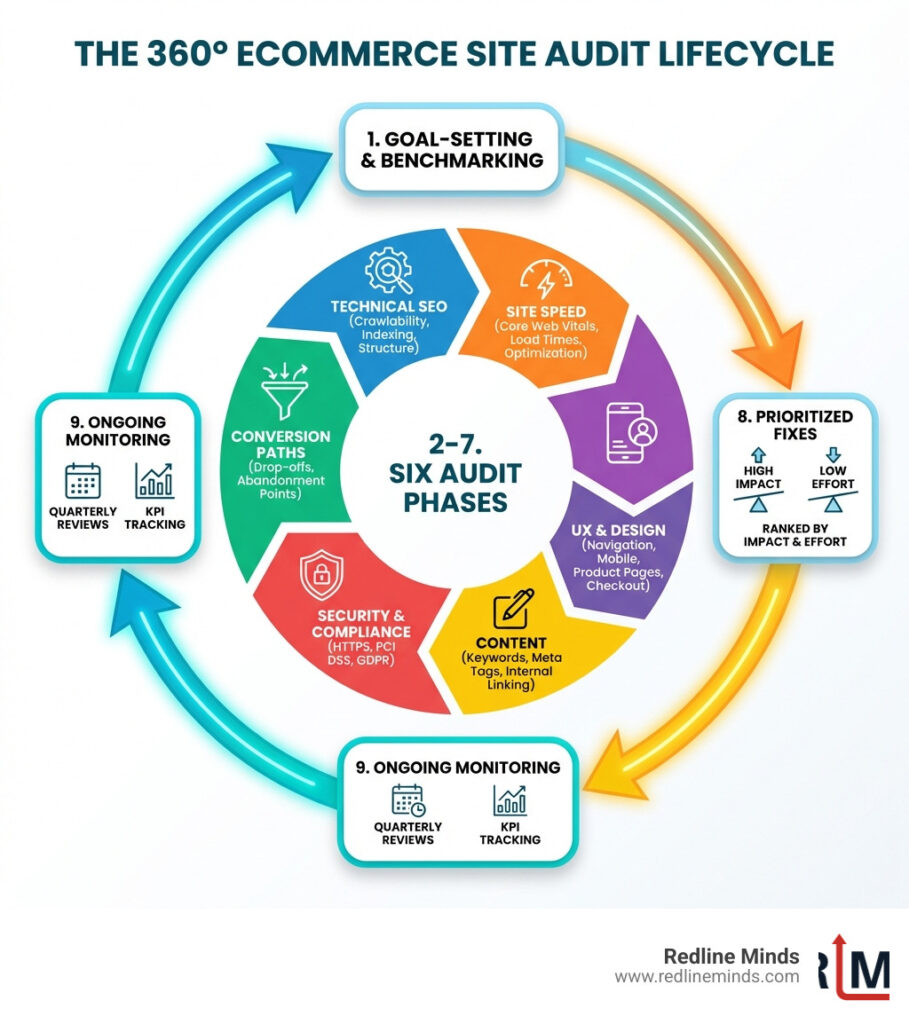
Here’s what an ecommerce site audit covers:
- Technical SEO — crawlability, indexing, broken links, redirects, and site structure
- Site speed and performance — Core Web Vitals, page load times, image optimization
- User experience (UX) — navigation, mobile design, product pages, checkout flow
- Content and on-page SEO — keyword usage, meta tags, internal linking, duplicate content
- Security and compliance — HTTPS, PCI DSS, GDPR, and accessibility standards
- Conversion paths — where visitors drop off and why they don’t buy
Your store is open 24/7. But that doesn’t mean it’s working 24/7.
Most mid-sized retailers are so focused on running the business — managing inventory, running ads, fulfilling orders — that the website itself gets neglected. Pages slow down. Links break. Product descriptions go stale. Checkout steps create friction nobody notices until sales plateau.
The hard truth? Your customers notice before you do. Nearly 70% of consumers say they’re less likely to buy — or even return — when a page loads slower than they expect. And almost 70% of shoppers abandon their cart before completing a purchase.
These aren’t just statistics. They’re revenue walking out the door.
An ecommerce site audit is how you find the leaks before they drain your growth. Think of it as a full health check for your virtual storefront — one that tells you exactly what to fix, in what order, to get the most impact.
What is an eCommerce Site Audit and Why Does it Matter?
At its core, an ecommerce site audit is a CSI-style investigation into your digital storefront. While a standard website audit might look at general blog traffic, an ecommerce-specific audit focuses on the gears that drive revenue: product discovery, the add-to-cart journey, and the security of the transaction.
Why does it matter so much? Because the digital landscape is unforgiving. Research shows that 70% of consumers are less likely to return to a site if the loading time is slower than expected. Even worse, the average 69.99% cart abandonment rate means that for every ten people who intend to buy, seven leave before the finish line.
If you aren’t looking at your Page Load Speed and technical health, you’re essentially running a physical store with a locked front door and wondering why nobody is at the register.
Identifying Revenue Leaks
We often see merchants pouring money into paid ads while their website has a “leaky bucket” problem. You can drive all the traffic in the world, but if your conversion rate is below the average conversion rate for eCommerce websites (which typically sits around 2.5% to 3%), you are overpaying for every customer.
An audit helps you identify exactly where those leaks are. Is your homepage failing to build trust? Understanding What Makes Great Homepage Ecommerce is the first step in plugging those holes. High bounce rates on mobile or a confusing navigation menu are often the “silent killers” of profitability that only a structured audit can reveal.
The Compounding Effect of Small Fixes
The beauty of a comprehensive ecommerce site audit is that you don’t always need a total redesign to see massive results. Small, incremental improvements across the board can lead to a massive compounding effect. For example, A Shopify ecommerce audit case study showed that fixing duplicate content and uncompressed images led to a 27% increase in organic sessions and a 14% lift in conversion rates within just six weeks.
When we look at Ecommerce Website Design, we aren’t just looking for “pretty” pages; we’re looking for functional efficiency. Reducing your load time by just one second can increase mobile conversions by 3%. These “small” wins add up to significant revenue growth over a fiscal year.
The Essential eCommerce Website Audit Checklist
To perform a successful audit, you need a map. You wouldn’t try to fix a car engine by just staring at the hood; you need to look at the diagnostic codes. Our checklist covers the four critical pillars of ecommerce health.
Technical SEO and Performance
Google’s “Core Web Vitals” are the benchmarks for how users perceive the speed and stability of your site. Many owners ask, “Google Core Vitals Ecommerce Sites Should You Worry?” The answer is a resounding yes.
Start by running your top pages through PageSpeed Insights. If your images are massive (a common culprit in ecommerce), use a tool like Squoosh to compress them without losing quality. We recommend following a structured SEO Checklist for Ecommerce to ensure you don’t miss “under the hood” issues like 404 errors or redirect chains that frustrate both Google and your shoppers.
User Experience and Design
Design isn’t just about colors; it’s about the “Information Scent.” Statistics show that 85% of customers say product information and high-quality pictures are essential when shopping. If your product pages are thin on details, you’re losing trust.
Furthermore, mobile is no longer an afterthought. Mobile users are five times more likely to bounce if your site isn’t optimized for their devices. A Perfect Product Page Design ensures that the “Add to Cart” button is easily clickable on a thumb-driven interface and that all critical info is visible without excessive scrolling.
Security, Accessibility, and Compliance
In ecommerce, trust is the primary currency. If your site isn’t following PCI Data Security Standards, you’re risking a data breach and a total loss of reputation.
But security isn’t the only legal hurdle. Accessibility is becoming a major focus for regulators and a massive opportunity for growth. 75% of Americans with disabilities use the internet daily, yet many stores remain unusable for them. Ensuring ADA Compliance Ecommerce isn’t just about avoiding lawsuits; it’s about opening your doors to a wider audience. If you sell internationally, you must also consult a checklist for U.S. companies to ensure you are meeting GDPR data privacy standards.
Step-by-Step Guide to Performing Your Audit
Ready to get your hands dirty? Here is how we approach the auditing process to ensure nothing falls through the cracks.
Step 1: Crawl and Indexing Analysis
First, we need to see what Google sees. Use Google Search Console to check your indexing status. Are there thousands of “Excluded” pages? In ecommerce, this is often caused by faceted navigation (filters for size, color, etc.) creating endless duplicate URLs.
Use the URL parameter crawl tool to tell Google which parameters to ignore. Additionally, ensure you have implemented canonical tags correctly. Every product variant should point back to the “master” product page to prevent your own pages from competing against each other in search results.
Step 2: Conversion Path and UX Evaluation
Next, we look at how people actually move through your site. You need to measure ecommerce activity in GA4 to see exactly where people drop off in the funnel.
To get even deeper, use session replay tools like Microsoft Clarity to watch real users struggle with your checkout. Are they getting stuck on the shipping selection? Use Qualaroo to trigger an exit-intent survey asking, “What stopped you from completing your purchase today?” Often, the fix is as simple as adding a skip the line product option or offering more transparent shipping costs earlier in the process.
Step 3: Optimizing the eCommerce Site Audit for Merchandising
An audit isn’t just about fixing what’s broken; it’s about finding missed opportunities to make more money. We call this a Merchandising Audit.
- Gamify the Cart: Implement a Tiered Progress Bar to show customers how close they are to free shipping.
- Boost AOV: Use “buy more, save more” logic to encourage bulk purchases. Check out buy more, save more configurations to see how this impacts your Average Order Value.
- Incentivize Action: Review your Gift With Purchase offers. Are they relevant to what’s in the cart?
- Smart Interstitials: Audit your pop-up strategy. Are they annoying, or are they providing value at the right time?
Advanced Strategies: AI Search and Competitor Benchmarking
The world of search is changing. We are moving beyond simple blue links into the era of AI Overviews and Large Language Models (LLMs).
Monitoring Your Brand in AI Search
Did you know that LLM traffic is 4.4x as valuable as organic traffic in terms of conversion rates? This is because AI searchers usually have very high intent. As part of your ecommerce site audit, you should check how AI models describe your brand.
Using the Ecommerce SEO Tools for Growth available today, you can track your “share of voice” in AI-generated answers. According to recent research, brands that optimize for AI visibility see a significant lift in high-intent traffic. Keep your Best SEO Tools for Ecommerce updated to include these AI-tracking capabilities.
Benchmarking Against Top Competitors
You don’t operate in a vacuum. Your audit should include a competitive gap analysis. Use Ahrefs and Moz Local to see which sites are linking to your competitors but not to you.
Run your competitors’ URLs through Google Keyword Planner to find “keyword gaps”—terms they rank for that you’ve completely missed. If a competitor has a better “Search” experience or more intuitive filtering, that’s a direct roadmap for your next set of site improvements.
Frequently Asked Questions about eCommerce Site Audits
How often should I conduct an eCommerce site audit?
We recommend a tiered approach. You should do a “mini-audit” of your KPIs and top-selling pages monthly. A full-scale ecommerce site audit should happen at least quarterly to catch technical regressions. If you’re in a highly competitive niche, you might even consider bi-weekly checks of your core conversion paths. For more tips on stay updated, you can follow us on LinkedIn.
What is the difference between a full site audit and an SEO audit?
A focused SEO audit looks primarily at how search engines see your site—things like schema markup, backlinks, and keyword rankings. A full site audit is much broader; it includes the SEO audit but adds layers for site speed, merchandising, checkout UX, and security compliance. A full audit tells you why people aren’t buying, whereas an SEO audit tells you why they aren’t visiting.
How do I prioritize fixes after an audit?
Don’t try to boil the ocean. We use an “Impact vs. Effort” framework. Revenue-critical issues (like a broken checkout or a 500-server error) are P0. High-impact, low-effort tasks (like compressing images or updating meta titles) come next. You can use Our SEO audit workbook to help organize and rank your findings.
Conclusion
At Redline Minds, we know that your ecommerce site is more than just a website—it’s the lifeblood of your business. Whether you are running a complex B2B portal or a high-growth hybrid store, the technical health of your platform determines your ceiling for success.
Don’t wait for your rankings to tank or your conversion rates to bottom out before taking action. A proactive audit is the cheapest insurance policy you can buy for your brand’s future.
Ready to see what’s really happening under the hood? Explore our full range of Services or let us help you Audit Your Store Today. We’ll help you find the leaks, fix the friction, and get your growth back on track.
Share this article
Tap into years of experience and turn your site’s visitors into buyers.
Related Posts
-
Compare Shopify Migration Services: Options Cheat Sheet
Compare Shopify migration services and find the right Shopify migration company for your store, from manual imports to…
-

Ultimate Checklist for Improving B2B Customer Experience
Ultimate Checklist for Improving B2B Customer Experience – Learn about b2b ecommerce customer experience
-

A Practical Guide to What to Sell Online for Profit
A Practical Guide to What to Sell Online for Profit – Learn about i don t know what…