
The Developer Guide to Custom Checkout Components for B2B Stores

Why Your Default Checkout Is Costing You B2B Revenue
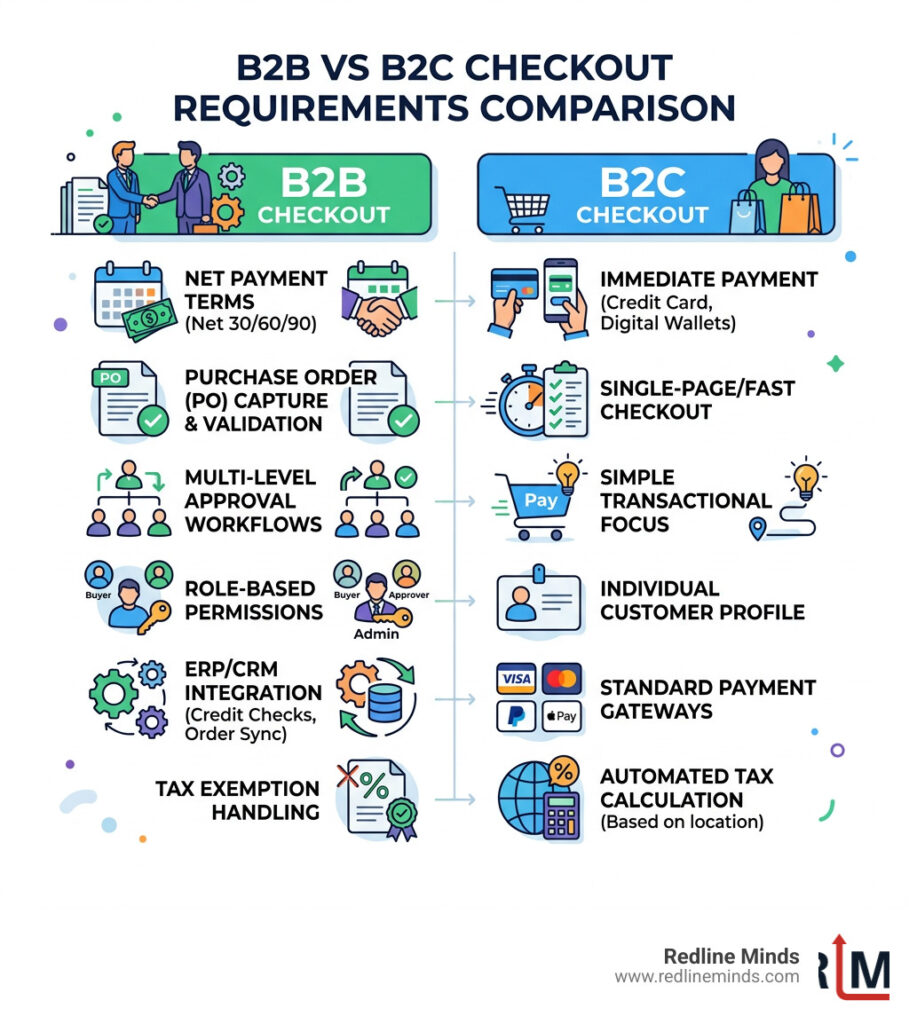
A custom B2B checkout flow is a purpose-built purchasing experience designed around how business buyers actually operate — with purchase orders, net payment terms, multi-user approvals, role-based permissions, and ERP integrations — rather than a consumer checkout adapted as an afterthought.
Here’s what a custom B2B checkout flow typically includes:
- Net terms support (Net 30/60/90) assigned by customer account
- Purchase Order (PO) capture with validation and contract matching
- Multi-level approval workflows with threshold-based triggers
- Role-based permissions for buyers, approvers, and admins
- ERP/CRM integration for real-time credit checks and order sync
- Tax exemption handling and custom field logic
- Conditional payment and shipping rules based on buyer profile
Default ecommerce checkouts are built for consumers. Fast, simple, transactional. But B2B buying doesn’t work that way.
A procurement officer placing a $200,000 reorder needs to attach a PO number, verify against a credit limit, route the order for manager approval, and have it sync directly into their ERP — before payment is even discussed. A standard Shopify or BigCommerce checkout handles none of that out of the box.
The cost of ignoring this is measurable. 83% of B2B buyers say they’ll abandon a purchase if payment terms aren’t available at checkout. Another 39% abandon not because of price, but because the checkout process is simply too complicated. With the B2B ecommerce market projected to hit $36 trillion by 2026, the gap between what buyers expect and what most stores deliver is becoming a serious revenue problem.
The good news? The tools to fix this exist. Platforms like Shopify Plus and BigCommerce have extensibility layers specifically designed for B2B customization — if you know how to use them.
This guide walks through the technical components, platform-specific implementation, and UX patterns you need to build a checkout that works the way your business buyers do.
Architecting the Custom B2B Checkout Flow: The Four-Layer Model
When we sit down to design a custom B2B checkout flow, we don’t just look at where the “Pay” button goes. We treat the checkout as a sophisticated workflow engine. McKinsey research highlights that over one-third of B2B buyers are now comfortable spending $500,000 or more in a single digital transaction. To facilitate those high-value orders, your architecture must be rock-solid.
We break this down into four critical layers:
- The Validation Layer: This is the gatekeeper. It ensures the order meets business rules (MOQs, SKU limits, or credit availability) before the buyer can even proceed.
- The Logic Layer: This handles the “if/then” scenarios. If a buyer belongs to “Tier 1 Wholesale,” they see Net 60 terms; if they are a “Guest,” they only see credit card options.
- The UX Layer: This is the interface. It’s about making complex tasks — like uploading a CSV for a bulk order or selecting three different shipping addresses for one cart — feel intuitive.
- The Integration Layer: This is the “glue.” It connects the checkout to your ERP (like NetSuite or Acumatica) and CRM in real-time to ensure inventory and customer data are perfectly synced.

Implementing Logic for a Custom B2B Checkout Flow
The logic layer is where the “magic” happens. Unlike B2C, where every user generally sees the same options, a B2B store must offer a tailored experience. This involves conditional visibility. For instance, you might hide specific high-freight shipping methods for international buyers or restrict certain payment methods based on the total order value.
When considering your ecommerce payment options, logic allows you to offer ACH or wire transfers only to verified accounts while keeping credit card payments open for smaller, one-off purchases. This level of control prevents high-fee transactions on low-margin bulk orders.
The Validation Layer for Enterprise Orders
Validation is about preventing errors before they reach your fulfillment team. Common checkout challenges cited by B2B buyers often involve technical glitches or rigid forms that don’t allow for business realities.
A robust validation layer should check:
- Credit Limits: Can this account actually afford this $50k order on their current Net 30 balance?
- Minimum Order Quantities (MOQ): Ensuring the buyer hasn’t dropped below the required volume for wholesale pricing.
- SKU Compatibility: Validating that the items in the cart can actually be shipped together (e.g., hazardous materials vs. standard goods).
Essential Components for B2B Checkout Customization
To build a truly professional experience, several “non-negotiable” components must be integrated into your custom B2B checkout flow. As the B2B ecommerce market continues its trajectory toward $36 trillion, these features are becoming the standard, not the exception.
Net Terms: Net 30/60/90
In the B2B world, cash is king, but credit is the lifeblood of trade. Most business buyers expect to pay via invoice. Your checkout must be able to recognize a logged-in user, check their assigned terms (Net 30, 60, or 90), and present “Pay on Account” as a valid payment method. This requires a deep connection between your store’s customer profiles and your ERP’s financial data.
Purchase Order (PO) Capture
If you don’t have a PO field, you’re essentially asking your buyer to do extra manual work later. A custom checkout should not only have a text field for the PO number but also a file upload component for the official document. This ensures that the procurement and accounts payable teams have everything they need to reconcile the order immediately.
Handling Multi-Level Approval Workflows
B2B buying is rarely a solo sport. Often, a junior buyer builds the cart, but a department head must approve any spend over $5,000.
- Sequential Approvals: The order moves from Buyer -> Manager -> Finance.
- Threshold-based Triggers: Orders under $1,000 go through instantly; anything higher pauses for a digital “signature.”
Implementing these workflows directly within the checkout prevents the “abandon and email” cycle. By utilizing B2B self-service portals, you allow companies to manage their own internal hierarchies without needing your team to intervene.
Tax Exemption and Custom Field Integration
Handling sales tax in a B2B context is a frequent headache. Your checkout needs the ability to:
- Verify VAT numbers in real-time (for international trade).
- Allow buyers to toggle “Tax Exempt” status and upload their certificate if it isn’t already on file.
- Store custom metadata, such as internal cost centers or department codes, which are vital for the buyer’s internal accounting.
For more details on managing these complex transactions, check out our guide on ecommerce payment systems.
Platform-Specific Implementation: Shopify Plus vs. BigCommerce
Choosing the right platform is half the battle. While both Shopify Plus and BigCommerce are leaders in the space, they handle a custom B2B checkout flow quite differently.
| Feature | Shopify Plus | BigCommerce |
|---|---|---|
| B2B Native Features | Strong (Company Profiles, Price Lists) | Excellent (B2B Edition, Custom Groups) |
| Checkout Extensibility | Via Checkout UI Extensions & Functions | Via Checkout SDK & Open Checkout |
| Custom Logic | Shopify Functions (Backend) | API-First / Headless options |
| Net Terms | Native in B2B modules | Native via B2B Edition |
Customizing Shopify Plus for Wholesale
Shopify Plus has made massive strides with its “B2B on Shopify” offering. You can now create Company Profiles that link multiple buyers to a single business entity, each with their own permissions.
For developers, the power lies in Checkout Extensibility. Using Shopify Functions, you can write custom logic in Rust or JavaScript that runs on Shopify’s servers. This allows you to hide payment methods, customize shipping rates, or validate cart contents against complex business rules without hacking the checkout.liquid file (which is deprecated anyway). Our BigCommerce vs Shopify technical comparison goes into deeper detail on these architectural differences.
Leveraging BigCommerce for Industrial B2B
BigCommerce is often the preferred choice for industrial B2B due to its “Open Checkout” philosophy. Their Checkout SDK allows developers to build a completely custom frontend for the checkout while still using BigCommerce’s secure payment processing.
This is particularly useful if you need a “Headless” checkout experience where the purchasing flow is embedded into a custom mobile app or a specialized dealer portal. By utilizing core plug-ins for BigCommerce, you can further enhance the functionality with pre-built B2B logic for things like complex freight calculations.
Optimizing the UX Layer for Complex B2B Workflows
A custom B2B checkout flow shouldn’t just be functional; it should be fast. B2B buyers aren’t shopping for fun; they are fulfilling a job requirement.
Reducing Abandonment with a Custom B2B Checkout Flow
Industry insights show that B2B cart abandonment is often a result of friction. If a buyer reaches the end of a long order process and realizes they can’t enter their PO number, they leave. To combat this, we recommend:
- Progressive Disclosure: Don’t overwhelm the user with 20 fields at once. Show only what is necessary for their specific user role.
- Inline Validation: Tell them the PO number is required now, not after they click “Submit.”
- One-Click Reordering: Since many B2B purchases are repetitive, allow buyers to bypass the checkout entirely by “cloning” a previous order from their dealer portal.

Mobile-First Design for Field Technicians
Don’t assume your buyer is sitting at a desk with two monitors. Many B2B orders are placed by field technicians on a tablet or smartphone at a job site. This requires:
- Large Touch Targets: Easy-to-tap buttons for selecting quantities.
- Offline Persistence: If the Wi-Fi cuts out in a warehouse, the cart shouldn’t disappear.
- Simplified Navigation: A focused, one-page checkout that minimizes scrolling.
For more on designing pages that convert, see our thoughts on perfect product page design.
Integrating the Checkout with ERP and CRM Systems
The checkout is only as good as the data feeding it. In an enterprise environment, your ecommerce site is just one part of a larger ecosystem. McKinsey notes that companies using data-driven B2B strategies see growth rates significantly above the market average.
Real-Time Sync and Automated Invoicing
When a buyer completes a custom B2B checkout flow, several things should happen instantly:
- ERP Injection: The order is pushed to NetSuite, Acumatica, or Sage to reserve inventory.
- Credit Update: The buyer’s available credit limit is reduced by the order amount.
- Invoice Generation: A digital invoice is created and emailed to the buyer’s accounting department.
Security and Compliance in B2B Transactions
Security is paramount when dealing with high-value business transactions. Salesforce research indicates that 79% of B2B customers expect uniform, secure interactions across all channels.
- PCI-DSS Compliance: Ensuring payment data is handled securely.
- Audit Trails: Keeping a detailed log of who approved an order and when.
- Data Encryption: Protecting sensitive corporate financial information and VAT details.
Frequently Asked Questions about Custom B2B Checkout Flows
How do I implement Net 30 terms in a custom checkout?
On Shopify Plus, this is typically handled via Company Profiles. You assign the “Payment Terms” attribute to the company, and the checkout will automatically offer “Pay on Account” to any buyer associated with that company. On other platforms, you may need a custom app or a logic layer that checks a customer tag and toggles the visibility of an “Invoice” payment method.
Can I add a mandatory Purchase Order field to my platform?
Yes. On Shopify Plus, you can use Checkout UI Extensions to add a required text field. On BigCommerce, you can use the Checkout SDK to inject a field into the payment step. In both cases, the data should be saved as an “Order Note” or “Metafield” so it appears on the final invoice and in your ERP.
What is the typical ROI for a custom B2B checkout development?
While development costs vary, the ROI is usually seen in three areas:
- Reduced Support Costs: Fewer phone calls from buyers who can’t figure out how to pay.
- Higher Conversion Rates: A 10-20% lift is common when moving from a “retail-style” checkout to a true B2B flow.
- Faster Reconciliation: Automated PO and invoice matching saves your accounting team hours of manual work every week.
Conclusion
Building a custom B2B checkout flow is about more than just adding a few extra fields; it’s about respecting your buyer’s time and aligning with their professional workflows. Whether you are on Shopify Plus or BigCommerce, the goal remains the same: remove the friction that prevents high-value orders from crossing the finish line.
At Redline Minds, we specialize in exactly this kind of complexity. From ecommerce consulting to deep-level web development for B2B and hybrid stores, we help retailers in Tennessee and across the country turn their digital channels into growth engines.
Ready to stop losing revenue to a clunky checkout? Contact our team for a custom B2B strategy today and let’s build a purchasing experience that actually works for your business.
Share this article
Tap into years of experience and turn your site’s visitors into buyers.
Related Posts
-

The Complete Guide to Affiliate App for Shopify
Discover the best affiliate app for Shopify to grow sales, manage referrals, and boost merchant revenue in 2026.
-

The Ultimate Guide to Types of E-Commerce Payment Systems
Learn the types of e commerce payment system to boost sales and reduce cart abandonment in this complete…
-

A Practical Guide to AI Agent Integration Methods
Learn how AI agent integration connects enterprise systems with MCP, Unified APIs, and custom code for secure, real-time…