
Compare Shopify Migration Services: Options Cheat Sheet
Choosing the Right Shopify Migration Company and Approach
When moving your store to Shopify, selecting the right migration path is crucial. Every merchant’s ecosystem is unique, ranging from simple product catalogs to highly complex B2B operations with deep ERP integrations. Choosing a migration approach depends on your inventory size, historical data needs, internal technical expertise, and custom functionality requirements.
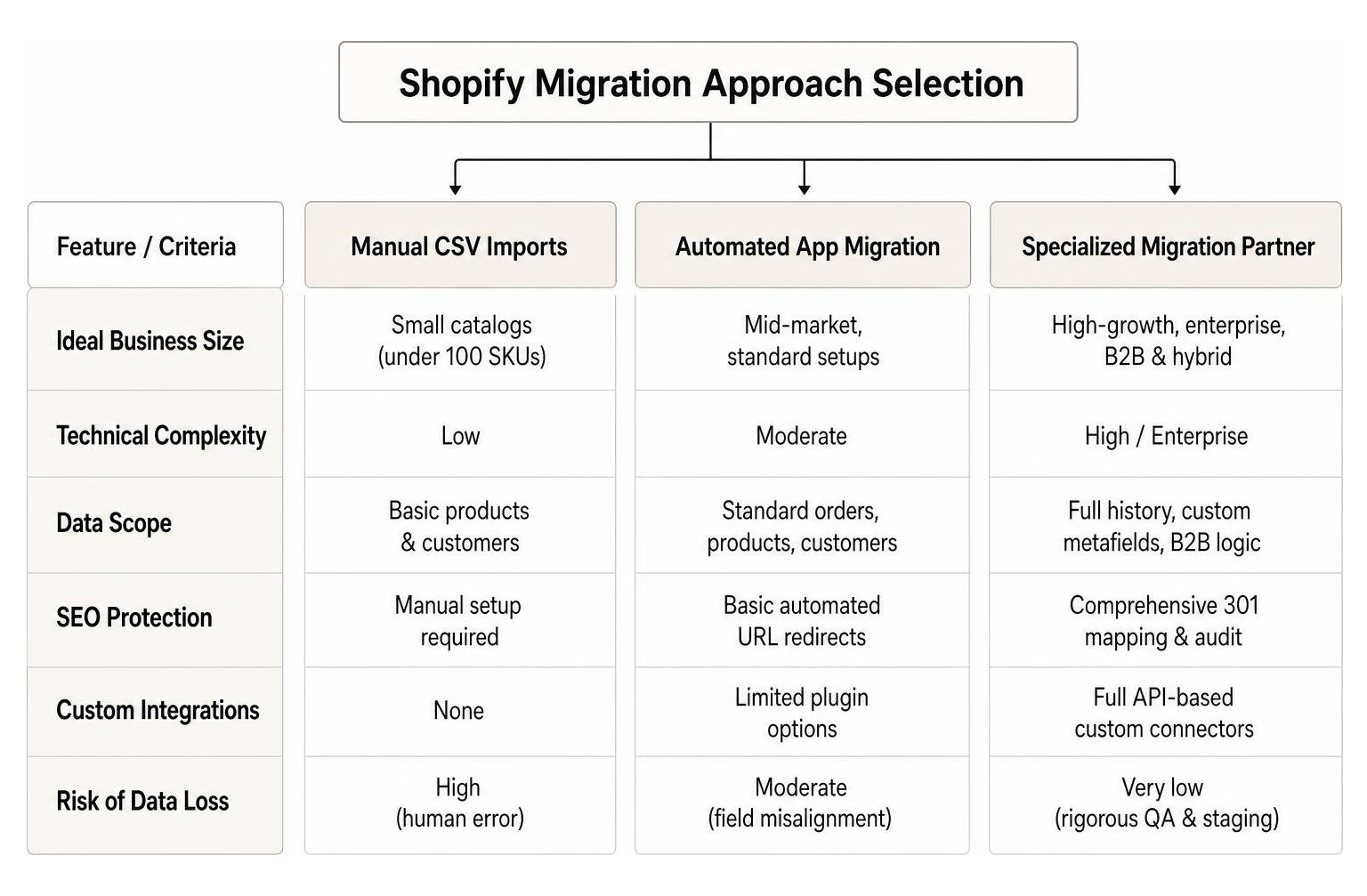
To help you weigh your options, here is a quick overview of how the three primary migration methods compare across key criteria:
| Feature / Criteria | Manual CSV Imports | Automated App Migration | Specialized Migration Partner |
|---|---|---|---|
| Ideal Business Size | Small catalogs (under 100 SKUs) | Mid-market, standard setups | High-growth, enterprise, B2B & hybrid |
| Technical Complexity | Low | Moderate | High / Enterprise |
| Data Scope | Basic products & customers | Standard orders, products, customers | Full history, custom metafields, B2B logic |
| SEO Protection | Manual setup required | Basic automated URL redirects | Comprehensive 301 mapping & audit |
| Custom Integrations | None | Limited plugin options | Full API-based custom connectors |
| Risk of Data Loss | High (human error) | Moderate (field misalignment) | Very low (rigorous QA & staging) |
Manual CSV Imports for Small Stores
For brand-new boutiques or small online shops managing fewer than a hundred basic products, manual CSV imports offer a straightforward starting point. Shopify natively allows merchants to import core data entities, such as inventory files and basic customer lists, using structured spreadsheet templates.
However, manual entry has distinct boundaries. CSV templates strictly enforce pre-defined columns for product handles, titles, prices, and SKUs. If your legacy catalog relies heavily on nested categories, custom product attributes, or complex option setups, forcing that data into basic spreadsheets often leads to broken image links and mangled inventory levels. While CSV files work well for light data lifting, relying on them for multi-thousand SKU catalogs usually results in frustrating formatting errors and manual cleanup work.
Automated App-Based Migration Tools
Automated migration software available in the Shopify App Store provides a middle ground for established retailers with standard store setups. These self-service tools connect your source store to your new target store using automated API connectors. They map legacy fields—such as product categories, customer profiles, and order details—into corresponding Shopify fields through a guided graphical user interface.
While automated apps speed up transfer times for standard data types, they can struggle when encountering custom data structures. Third-party apps operate on rigid, pre-coded data mapping rules. If your original website utilizes custom database plugins, non-standard order statuses, or unique product options, automated apps may drop those fields entirely without warning. Additionally, API rate limits enforce strict throttling on how fast data transfers across systems, meaning large databases can still experience unexpected delays.
Partnering with a Specialized Shopify Migration Company
For high-volume brands, complex B2B suppliers, and hybrid merchants, hiring a specialized shopify migration company is the most reliable strategy. Beyond basic data movement, an experienced partner manages technical architecture, custom API development, custom front-end UX mapping, and post-launch optimization.
Working with an expert agency eliminates the guesswork surrounding legacy data transformation. Rather than relying on rigid automated scripts, migration engineers build custom data migration pipelines that cleanly map deep historical data—including customer order histories, product variants, custom metafields, and wholesale tiers. To protect your brand’s operational health, we always recommend consulting experienced developers early in the process. You can learn more about avoiding costly web partner pitfalls in our guide on Don’t Hire a Web Design and Development Company Until You Read This.
What Data Can Be Migrated to Shopify Safely
A primary concern for any merchant changing platforms is data loss. Store data represents years of hard-won customer relationships, transactional records, and inventory tracking. Fortunately, when executed systematically, almost all operational store data can be safely extracted, transformed, and loaded into Shopify.

Transferable Data Entities
When migrating your store, data integrity requires organizing customer, financial, and catalog records into their correct destination fields in Shopify. Here is a breakdown of the primary data entities that can be safely migrated to your new storefront:
- Products and Catalogs: Titles, descriptions, SKUs, inventory counts, pricing, cost per item, images, alt text, tags, and automated collections.
- Customer Database: Names, primary email addresses, shipping and billing addresses, phone numbers, and customer tags or segmentation notes.
- Historical Orders: Order numbers, purchased items, order quantities, total transaction values, fulfillment statuses, line-item discounts, and customer notes.
- Content and Layout: Blog posts, custom pages (e.g., About Us, FAQ), embedded images, and basic content author metadata.
- Store Architecture: Menu navigation structures, category relationships, and SEO metadata (meta titles, meta descriptions, and URL handles).
Security Protocols During Migration
Data transfers involve moving sensitive business records and personal customer details across active network connections. Maintaining strict security protocols throughout the migration process protects your brand against accidental leaks and regulatory compliance violations.
A trustworthy shopify migration company enforces end-to-end security measures. All data transfers should occur over secure HTTPS connections using encrypted API tokens rather than raw administrative passwords. To comply with GDPR, CCPA, and global privacy standards, database access must be tightly restricted to authorized migration engineers under strict Non-Disclosure Agreements (NDAs). Furthermore, legacy platform databases should be full-backed up prior to extraction and stored in an encrypted environment until post-launch validation is complete.
Overcoming Technical Limitations and Migration Timelines
Every ecommerce platform handles data architecture differently. When moving to Shopify, understanding platform-specific technical constraints prevents late-stage launch bottlenecks and operational delays.
Product Variant Caps and Metafields
One of Shopify’s most defined database rules is its native product option structure. Shopify enforces a hard cap of 2048 (may be lower on some plans) variants and 3 option attributes per product (e.g., Size, Color, Material). If your legacy platform allows unlimited product options—such as custom engraving fields, custom dimensions, or dozens of colorways—importing those records directly into standard variant fields will cause data truncations.
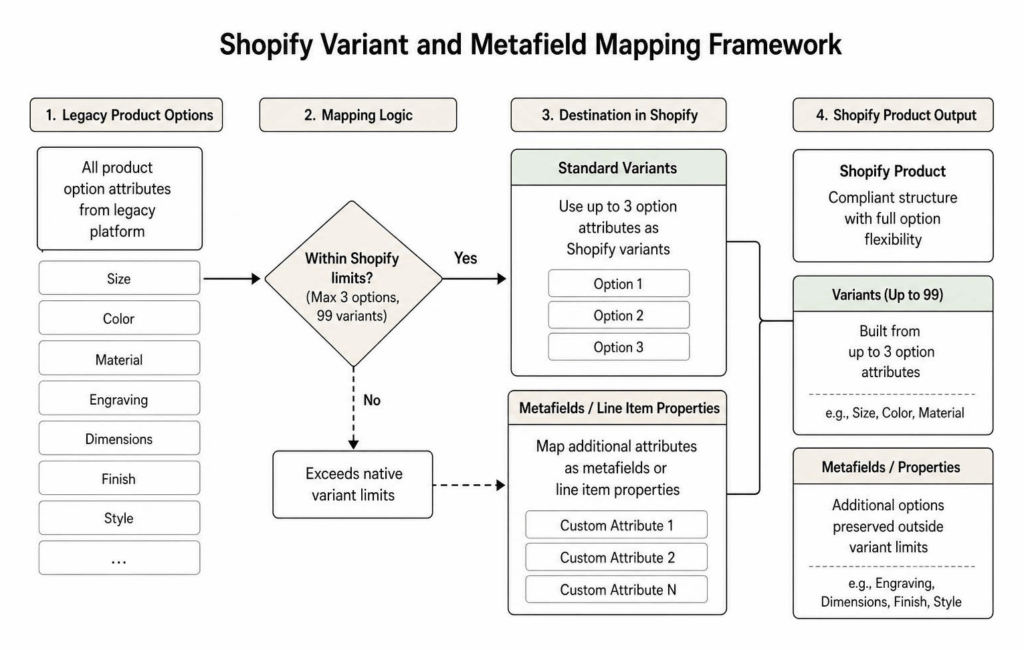
To bypass these limitations without compromising your product options, professional developers leverage Shopify Metafields and custom front-end apps. Option attributes that exceed the native 3-option rule are mapped cleanly into custom metafield definition fields or linked line-item property configurations. This keeps your backend organized while providing seamless selection options for shoppers on the front end.
Historical Order Dates and Password Encryption
Another platform-specific technical distinction involves historical order dates. When legacy order records are created in Shopify via API during migration, Shopify automatically assigns the current execution date to the native created_at database timestamp field. To prevent your historical financial reporting and tax audits from showing all past sales as occurring on “Migration Day,” migration specialists map historical transaction timestamps into Shopify’s processed_at field. Shopify uses this field across sales reports and customer account portals to preserve real sales timelines.
Customer passwords present a different challenge. Due to global security standards and proprietary hashing algorithms, plain-text customer passwords cannot be extracted from legacy platforms, nor can they be directly inserted into Shopify’s hosted user database. Instead, migration plans include a automated customer account invitation campaign post-launch. Once your new store goes live, returning customers receive a secure, branded notification prompting them to activate their account and reset their password on the new platform.
Maintaining SEO Integrity and Post-Migration Validation
A major concern during website migration is losing hard-earned organic search rankings. A platform change naturally alters underlying URL paths, site taxonomies, and page rendering speeds. Without a technical SEO strategy, search engines can drop indexed URLs, resulting in ranking drops and organic traffic loss.

Preserving your search engine visibility requires mapping every active, indexed legacy URL to its exact equivalent on Shopify using 301 permanent redirects. This includes product handles, collection pages, blog articles, and legacy landing pages. If your old platform used trailing slashes or extended folder paths (e.g., /products/category/item-name.html), mapping those paths to Shopify’s streamlined URL structures (e.g., /products/item-name) passes established search authority directly to the new storefront.
Essential Post-Migration Checklist
Before updating your DNS records and pointing your domain to Shopify, complete a thorough launch review to ensure everything functions properly. Here is an essential checklist every store owner should follow:
- [ ] Verify 301 Redirect Mapping: Test high-traffic legacy URLs to confirm they redirect properly without triggering 404 error pages.
- [ ] Run End-to-End Payment Testing: Execute real transactions using live credit cards, third-party express checkouts, and buy-now-pay-later (BNPL) gateways.
- [ ] Audit Inventory Syncing: Confirm real-time inventory counts match across physical warehouses, retail POS systems, and your new Shopify backend.
- [ ] Inspect Customer Notifications: Trigger transactional emails—such as order confirmations, shipping updates, and password reset requests—to verify design alignment and link accuracy.
- [ ] Review SEO Metadata & Sitemaps: Verify meta titles, meta descriptions, canonical tags, and structured schema markup across primary landing pages, then submit your new XML sitemap to Google Search Console.
- [ ] Verify Third-Party Integrations: Confirm connected apps, marketing automation tools, CRM software, and ERP connectors are communicating correctly through API endpoints.
Selecting an Enterprise Shopify Migration Company
Selecting the right web development team is a strategic decision that impacts your company’s long-term operational success. High-volume merchants, enterprise B2B distributors, and hybrid retailers require custom architecture that off-the-shelf templates simply cannot accommodate.
As a specialized ecommerce agency, we help growing brands navigate complex store transitions seamlessly. Whether you need custom B2B buyer portals, wholesale customer segmentation, dynamic ERP inventory synchronization, or specialized front-end UX design, our team builds tailored solutions focused on conversion performance. Explore our complete range of capabilities on our The Best Ecommerce Website Services to Help You Bag More Sales guide, or dive into our dedicated Shopify E-Commerce Services page to see how we help growing businesses scale.
Frequently Asked Questions About Shopify Migration
How long does a typical store migration to Shopify take?
Migration timelines vary significantly depending on catalog scale, historical data depth, front-end customization, and custom third-party integrations. Simple catalog transfers for small brands using standard themes can take as little as 1 to 2 weeks. However, mid-market to enterprise-level migrations—involving custom theme design, deep ERP/CRM connections, complex B2B logic, and hundreds of thousands of historical records—typically range between 6 to 12 weeks.
Will my store experience downtime during the migration process?
No, your existing ecommerce website does not need to experience operational downtime during migration. All database extraction, data transformation, theme design, custom API coding, and testing occur in a staging development environment while your current store continues processing customer orders uninterrupted. On launch day, once staging validation is complete, DNS records are repointed to Shopify. The domain transition takes effect almost instantly, ensuring a seamless shopping experience for your visitors.
What is the difference between BigCommerce and Shopify migration workflows?
While both represent premier SaaS ecommerce platforms, migrating from BigCommerce to Shopify involves managing distinct differences in platform architecture, catalog structures, and API behaviors. BigCommerce offers native multi-storefront management and expansive variant choices built directly into its core database. When moving to Shopify, multi-store layouts or extensive option sets often require custom metafield structuring, custom apps, or Shopify Plus enterprise configurations. For an in-depth technical analysis comparing platform mechanics, explore our comprehensive technical guide on BigCommerce vs Shopify: Technical Comparison.
Conclusion
Migrating your online store to Shopify is a major strategic milestone that can unlock faster page loads, better checkout conversion rates, and lower platform maintenance overhead. However, technical transitions require thoughtful execution. By choosing the right migration strategy, setting up proper security standards, mapping complex product data carefully, and protecting your organic search rankings, you set your business up for sustainable long-term growth.
As a dedicated ecommerce agency with headquarters at 349 Nancy Dr, Jefferson City, TN 37760, Redline Minds brings years of technical experience to complex store transitions. We specialize in custom B2B setups, hybrid commerce architectures, responsive web development, and strategic digital marketing. If you are ready to move your store to Shopify without compromising operational momentum or data integrity, explore our tailored Shopify E-Commerce Services and schedule a consultation with our development team today.
Share this article
Tap into years of experience and turn your site’s visitors into buyers.
Related Posts
-

Ultimate Checklist for Improving B2B Customer Experience
Ultimate Checklist for Improving B2B Customer Experience – Learn about b2b ecommerce customer experience
-

A Practical Guide to What to Sell Online for Profit
A Practical Guide to What to Sell Online for Profit – Learn about i don t know what…
-

A Quick Start Guide to Ecommerce Basics
Learn what is ecommerce in this quick start guide covering models, benefits, and trends for modern online retail…