
How to Sync Your Shop and Socials Without Losing Your Mind

Why Instagram Shopping Ecommerce Integration Is a Game-Changer for Online Retailers
Instagram shopping ecommerce integration is the process of connecting your online store to Instagram so customers can discover and buy your products without ever leaving the app.
Here’s the quick version of how it works:
- Connect your store (Shopify, WooCommerce, BigCommerce, etc.) to Meta Commerce Manager
- Sync your product catalog so Instagram can pull your product data
- Get approved for Instagram Shopping by Meta
- Tag products in posts, Stories, and Reels
- Customers tap a tag and go straight to checkout — on Instagram or your store
If you’re running a mid-sized online store and your Instagram feels more like a branding expense than a revenue channel, you’re not alone. Most retailers post consistently, build a following, and then watch that audience scroll right past without buying anything.
The problem usually isn’t your content. It’s the friction between discovery and purchase.
Instagram has quietly become one of the most powerful shopping platforms on the planet. 130 million people tap on Instagram shopping posts every single month. Users spend an average of 33 minutes a day on the platform — and a growing share of that time is spent discovering products.
The gap between “I like this” and “I bought this” used to be wide. Instagram shopping integration closes it.
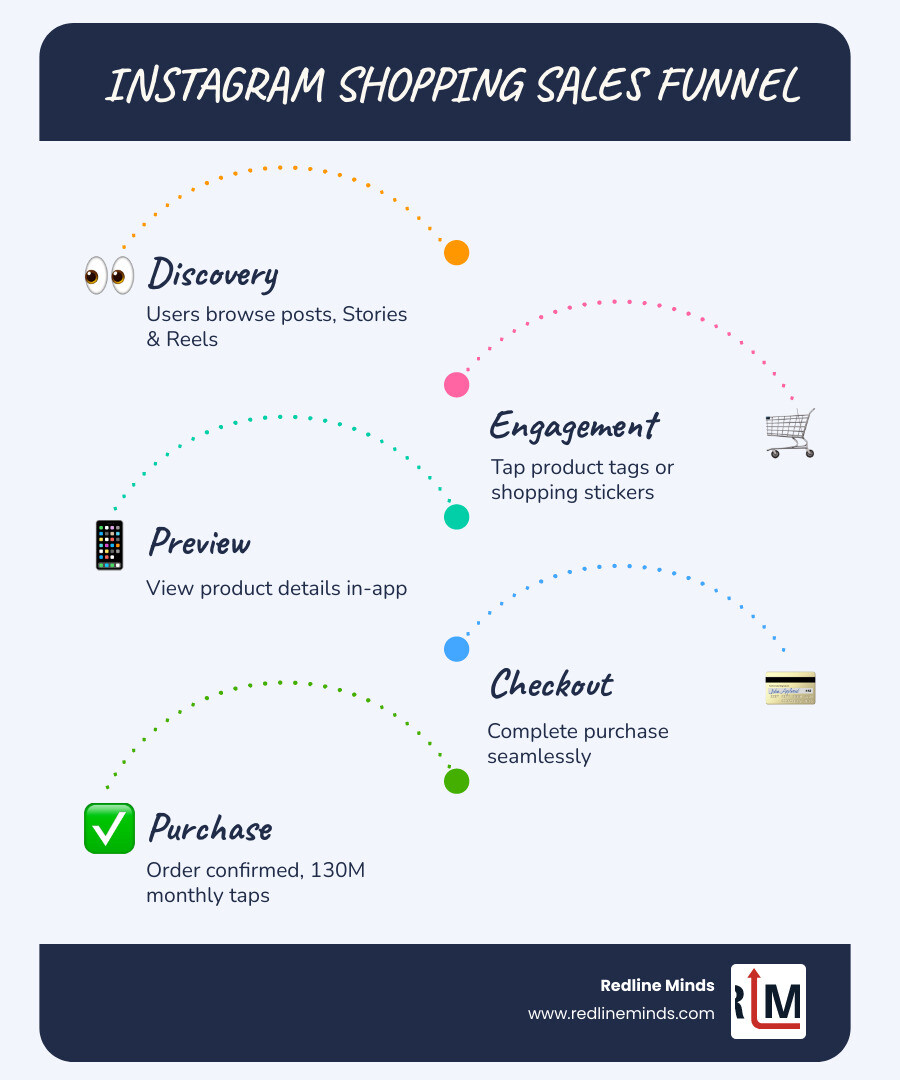
What is Instagram Shopping Ecommerce Integration and Why It Matters
At its core, Instagram shopping ecommerce integration is the connective tissue between your warehouse (your website) and your storefront (your social feed). It transforms Instagram from a simple photo-sharing app into a high-octane social commerce engine.
Why should you care? Because consumer behavior has shifted. Research shows that 54% of consumers have reported spending more time on social feeds over the past two years. When people are scrolling, they aren’t just looking for life updates; they are looking for inspiration. If they see a product they love but have to close the app, open a browser, search for your site, and find the item manually, you’ve likely lost them.
By using the Native Instagram Shopping (Meta Commerce Manager) tools, you remove that friction. You allow for visual discovery where a user can tap a “shopping bag” icon and see the price, description, and a direct link to buy. For those of us in the B2B or hybrid space, this is a massive opportunity to Use Instagram to Drive Product Sales by reaching decision-makers where they spend their downtime.
Eligibility and Requirements for Instagram Shopping Integration
Before we get into the “how-to,” we need to make sure you’re allowed at the party. Meta is fairly strict about who can use their commerce features. To get approved, your business must meet several criteria:
- Supported Markets: You must be located in a country or region that is supported by Instagram.
- Physical Goods: Currently, Instagram Shopping is for physical, tangible products. If you sell digital downloads or subscriptions, you can promote them, but you won’t be able to use the native tagging features.
- Compliance: Your store must follow Meta’s commerce policies. This means no prohibited items and a requirement for accurate product descriptions and clear refund policies.
- Professional Account: You cannot use a personal profile. You must switch to An Instagram Business Account.
- Connected Assets: Your Instagram account must be linked to A Facebook Page that represents your brand.
- Domain Verification: You must prove you own the website domain where you are sending traffic.
Technical Setup: Connecting Your Product Catalog via Meta Commerce Manager
The “brain” of your Instagram shopping ecommerce integration is the Meta Commerce Manager. Think of this as the central database that keeps your website and Instagram in sync.
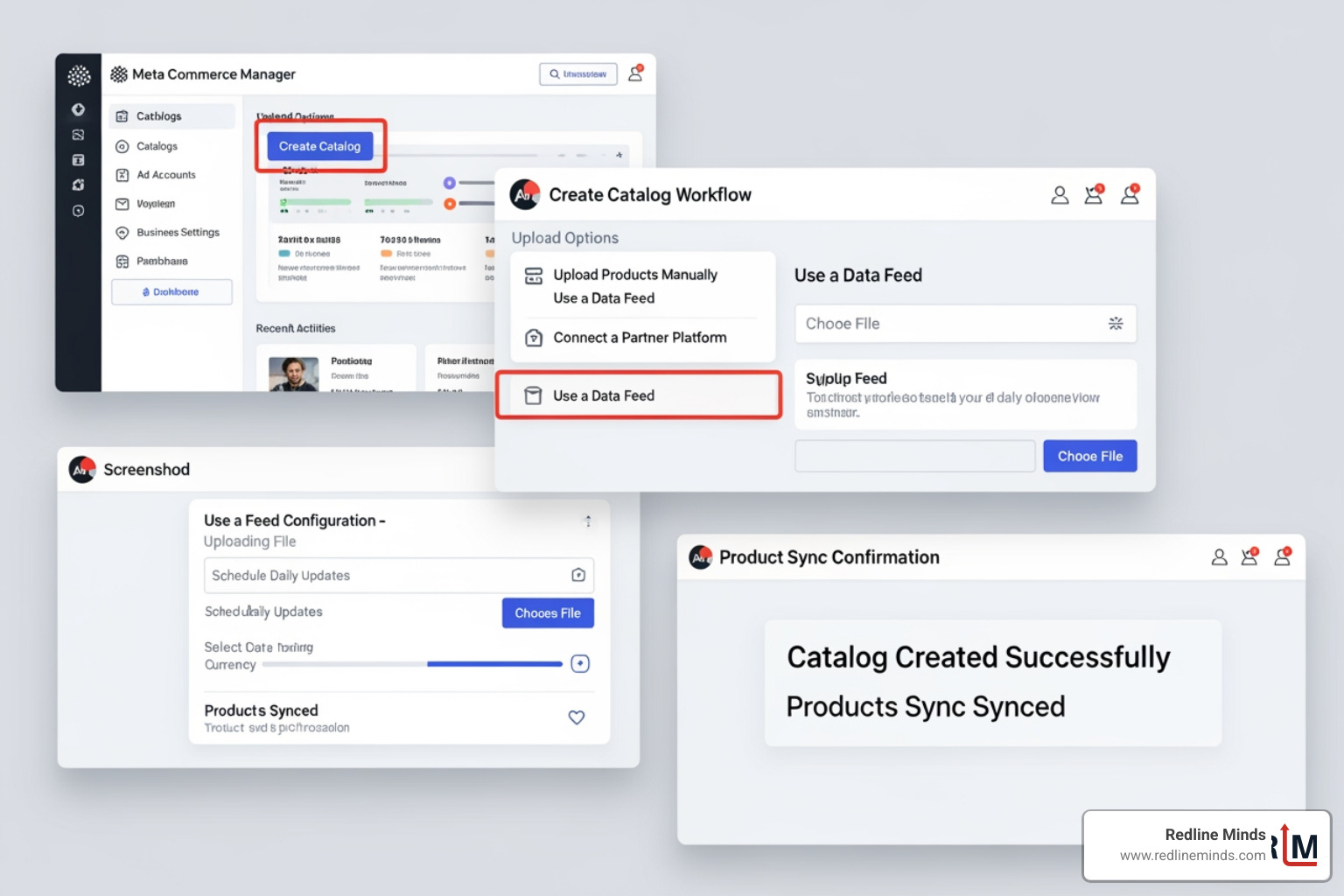
When you set up your product catalog, you are creating a live feed. If you change a price on your website or an item goes out of stock, the catalog updates automatically so you don’t accidentally sell something you don’t have.
To get started, head to Facebook Commerce Manager, click “Get Started,” and select “Create a Catalogue.” From here, you can choose to upload products manually (best for very small inventories), use a bulk spreadsheet, or—our preferred method—connect your ecommerce platform directly. Once the catalog is live and your account is approved, you’ll be able to Add shopping tags to Instagram posts with just a few taps.
Platform-Specific Guides: Shopify, WooCommerce, and BigCommerce
Choosing the right platform is half the battle. While we work with all major systems, the way they “talk” to Instagram varies.
| Feature | Shopify | WooCommerce | BigCommerce |
|---|---|---|---|
| Setup Speed | Very Fast | Moderate | Fast |
| Integration Type | Native Sales Channel | Plugin-based | Native via Feedonomics |
| Sync Frequency | Real-time | Near real-time | Real-time |
| Customization | Standardized | High | Very High |
Whether you need Services Shopify or Services BigCommerce, the goal is a seamless sync.
Streamlining the Shopify Connection
Shopify makes Instagram shopping ecommerce integration incredibly simple. You essentially add “Facebook & Instagram” as a sales channel within your Shopify admin. This creates a direct bridge. Once connected, your entire Instagram Shopping on Shopify experience is managed from one dashboard. It handles the domain verification and catalog sync for you, ensuring that your “Link in Bio” and product tags are always accurate.
Integrating WooCommerce with Meta
For the WordPress crowd, you’ll want to use the Facebook for WooCommerce plugin. This official extension connects your store to your Meta Business Suite. It’s a bit more “hands-on” than Shopify, but it offers more control for hybrid or B2B stores that might have complex pricing structures. After installing the plugin, you’ll run through a setup wizard to link your assets and begin the Facebook for WooCommerce catalog upload.
Maximizing Sales with Instagram Shopping Ecommerce Integration Strategies
Having the tech set up is great, but it’s just the foundation. To actually move the needle on revenue, you need to use the features strategically.
One of the most effective ways to drive sales is by leveraging User-Generated Content (UGC). We know that 88% of people trust recommendations from people they know more than any other form of marketing. When a customer tags your product in their own post, and you share that to your Story with a shopping tag, you are combining social proof with a direct path to purchase. This is a core pillar of Category Social Media Marketing Ecommerce strategy.
Tagging Products in Posts, Stories, and Reels for Instagram Shopping Ecommerce Integration
Don’t limit yourself to just the main feed.
- Stories: Use shopping stickers. These are highly interactive and perfect for “limited time” offers. You can only tag products on image Stories posts, not videos (though you can link to the shop).
- Reels: This is where the reach is. Tagging products in Reels allows you to reach people who don’t even follow you yet.
- Maintenance: If a product sells out or you change your mind, you can always Edit or remove shopping tags from Instagram posts to keep your feed clean.
Best Practices for Instagram Shopping Ecommerce Integration Success
We recommend the 5-3-1 rule to keep your feed balanced:
- 5 Value-based posts: Education, entertainment, or behind-the-scenes content.
- 3 Engagement posts: Questions, polls, or sharing UGC.
- 1 Promotional post: A direct “buy now” shoppable post.
High-quality imagery is non-negotiable. Instagram is a visual-first platform. If your photos look like stock photography, users will scroll past. Aim for lifestyle shots that show your product in action. This is a key part of modern Ecommerce Website Design—ensuring your brand aesthetic is consistent from the social feed to the checkout page.
Also, don’t ignore influencers. 69% of Gen Z shoppers have found something new through influencers recently. Partnering with “nano-influencers” (those with 1k–10k followers) can often yield higher engagement rates than big celebrities because their audience trusts them more.
Frequently Asked Questions about Instagram Integration
Can I sell digital products through Instagram Shopping?
No. Currently, Meta’s commerce policies state that Instagram Shopping is strictly for physical goods. This means no digital downloads, services, or subscriptions. While you can still use Instagram to market these items, you won’t be able to use the “tag product” feature that pulls from a catalog.
How does the checkout process work for integrated stores?
There are two main ways this works. For most businesses, the customer taps the product tag and is redirected to your website to finish the transaction. However, in certain regions like the U.S., you can enable Instagram’s in-app checkout. This allows the user to pay via Payments in Instagram without ever leaving the app. While in-app checkout reduces friction, redirecting to your site allows you to capture more first-party data.
Why is my product catalog not syncing correctly?
This is a common headache. Usually, it’s due to a “pending” or “rejected” Instagram Shop review_status. Check your Commerce Manager for any policy violations or missing information (like a missing SKU or price). Also, ensure your Meta Pixel is firing correctly on your website, as this helps Meta verify that the products in your catalog actually exist on your site.
Conclusion
At Redline Minds, we’ve seen how Instagram shopping ecommerce integration can turn a “quiet” social presence into a primary revenue driver. For our B2B and hybrid clients, this integration is about more than just “selling clothes”—it’s about creating a professional, seamless brand experience that meets customers wherever they are.
Social commerce isn’t just a trend; it’s a fundamental shift in how people buy. If you’re ready to stop leaving revenue on the table and want to ensure your technical setup is flawless, we’re here to help. Whether you need a full re-platforming or just a better way to sync your socials, we can guide you through the process. For More info about Redline Minds services, reach out to our team in Jefferson City, TN. Let’s get your shop and your socials in sync.
Share this article
Tap into years of experience and turn your site’s visitors into buyers.
Related Posts
-

The Complete Guide to Affiliate App for Shopify
Discover the best affiliate app for Shopify to grow sales, manage referrals, and boost merchant revenue in 2026.
-

The Ultimate Guide to Types of E-Commerce Payment Systems
Learn the types of e commerce payment system to boost sales and reduce cart abandonment in this complete…
-

A Practical Guide to AI Agent Integration Methods
Learn how AI agent integration connects enterprise systems with MCP, Unified APIs, and custom code for secure, real-time…